


Gather: Family Location & GPS
4.6405.00 Reviews
App Specs
- Version
- 1.446.0
- Updated On
- License
- Free
- Downloads
- 100,000+
- Developer
- gather.life
- Categories
- Lifestyle
- Platform
- Android
Screenshots

 Analysis by AppCompare
I find shared location most useful when it answers one specific question: “Are we close enough to meet, or should I keep waiting?” That is the practical appeal of Gather: Share Family Locations. Rather than relying on a chain of calls and messages, family members can use a common map to coordinate while they are out. The idea is simple, but it works best when everyone agrees on when sharing is useful and treats a location as a helpful cue, not a substitute for conversation.
A shared map can replace a lot of check-ins
Gather is a lifestyle app from gather.life, built around seeing where participating loved ones are. In my view, that shared view is its defining capability: it can reduce the small bits of uncertainty that come with meeting across a large venue or figuring out whether someone has started heading home. It is not a reason to monitor family members constantly. It is a way to make practical coordination less fiddly when the people involved are comfortable sharing their whereabouts.
The distinction matters. A map can show where a phone appears to be, but it cannot explain why someone has stopped, whether they are available to talk, or whether plans have changed. I would still send a message when timing matters or a location looks unexpected. Used that way, location sharing is a convenience rather than an assumption that everyone must always be reachable.
Make the circle useful before you need it
For a family, the best time to get set up is a quiet moment at home, not the middle of a busy trip. Decide together who should be included and what situations the shared map is meant to help with. One person might want it for school pickups, another for finding each other at events. Being clear about the purpose helps keep the app from feeling intrusive, especially for older children or relatives who value privacy.
Gather is free, rated for Everyone, and has a 4.6 average from around 3,800 ratings, with over 100,000 installs. It is available for Android and iOS, which makes it more practical for a household with a mix of phones. The current version is 1.400.1, and the app was released on September 3, 2024. Those details make it easy to assess the basics, but the important decision is still whether your family will use shared location in a considerate, agreed-upon way.
What the map is good at—and what it cannot settle
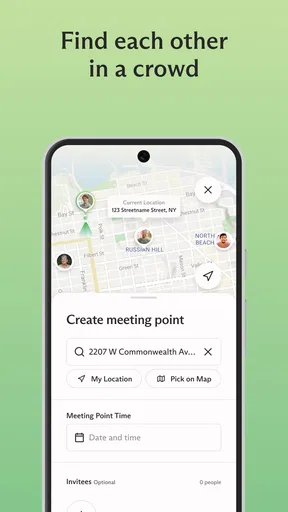
In a crowded place, the shared location view can narrow the search: instead of asking someone to describe a nearby entrance or shop, you can check where they appear to be and choose a meeting point. That is a small but real improvement when people are moving around independently. It is also useful for a pickup, when you want to coordinate timing without sending repeated “Are you there yet?” messages.
There is a limit, though: GPS location is not the same as a precise visual account of someone’s surroundings. Buildings, crowds, and phone settings can make a displayed position less useful than you hoped. I would use it to orient myself, then confirm the final few steps by message or call. If a family needs dependable, formal supervision rather than casual coordination, a shared map alone is not enough.
Worth Reading Before You Choose

Flipboard Shows What News Apps Must Do Beyond the Feed

Switching to Android Auto Means Rethinking Your Driving Routine

Google Calendar Makes a Crowded Week Easier to Manage

Ludo King Makes the Most of the Minutes Between Plans

Baby Panda World Brings Quick Play to Modern Phones, but Its Game Library Feels Busy

ESPN’s Live Game View Makes Following Close Games Easier
Privacy works best as a family agreement
Location sharing only feels reassuring when everyone understands who can see them and when. I would talk through expectations before inviting relatives, including when it is reasonable to pause sharing and how to handle a phone that is unavailable. That conversation is more useful than treating an app setting as a complete privacy plan. The right arrangement may be different for a parent and child than for adult siblings or grandparents.
Some families will prefer ordinary texts, calls, or a one-time location share for occasional meetups. Those options involve less ongoing visibility and may be a better fit if only one person needs directions or if relatives do not want a shared map running as part of their routine. Gather makes more sense when the group has recurring coordination needs and is comfortable with a standing shared-location arrangement.
Keeping Track Made Easy
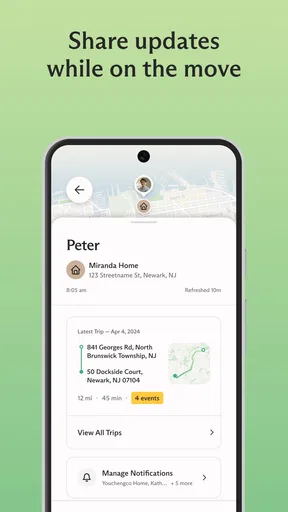
First off, Gather: Share Family Locations is all about making sure you know where your family members are without having to constantly check in via text or call. It’s like a digital family compass! The app uses real-time GPS tracking, so you can see at a glance where everyone is. This is super handy when coordinating meetups or ensuring everyone’s safe.
Setting Up and Getting Started
Setting up the app is a breeze. After downloading it from the app store, you just need to create an account and invite your family members to join your circle. The user interface is intuitive, and the onboarding process is straightforward. I appreciated the step-by-step guide that walks you through connecting with your family members.
The app is available on both Android and iOS, so it doesn’t matter what kind of phone your family members have—they can all join the fun. Just make sure everyone has their location services turned on!
Features at a Glance
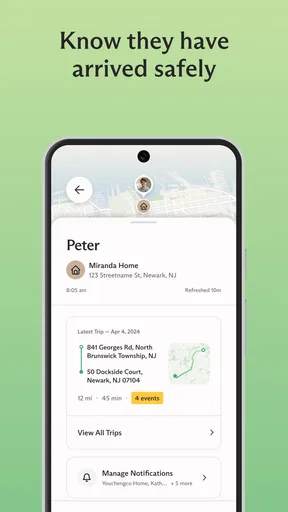
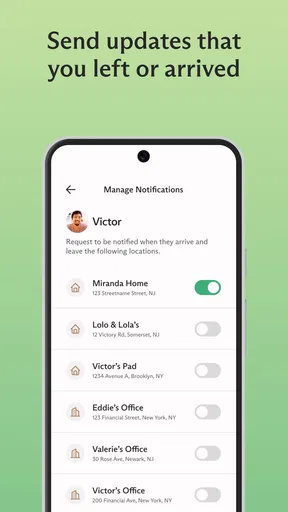
Once you’re all set up, you’ll find a range of features designed to enhance your family’s connectivity. One standout is the ability to set up geofencing alerts. These let you know when someone arrives or leaves a designated area, like home or school. It’s perfect for giving parents peace of mind when the kids are out and about.
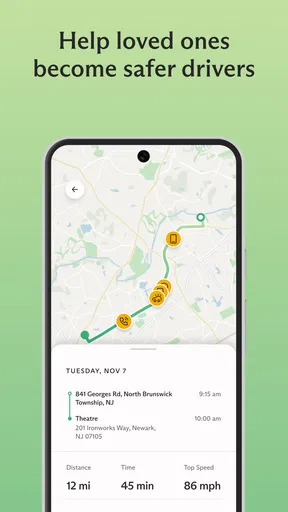
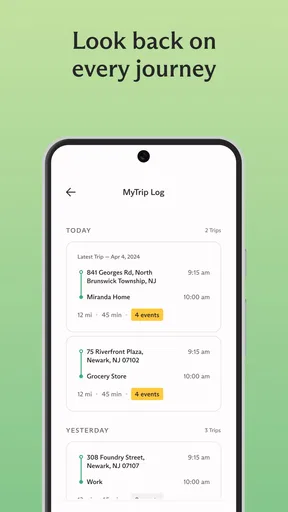
Another cool feature is the location history, which lets you see where your family members have been over the past few days. This can be helpful for remembering places you’ve visited or even tracking down a lost phone.
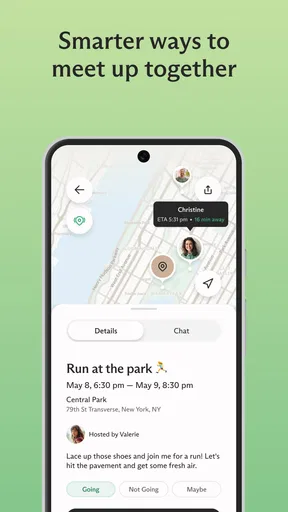
The app also allows for easy communication within the app. There’s a built-in chat feature, so you can send quick messages without switching apps. I found this especially useful for sending quick updates or coordinating plans on the fly.
Privacy Concerns? No Worries!
I know what you’re thinking: "What about privacy?" The developers of Gather have made sure to address these concerns. You have full control over who sees your location and when. You can easily turn off location sharing if you need some privacy or if your phone’s battery is running low. Plus, the app uses encrypted data to ensure your information is secure.
Real-World Use
In terms of real-world application, I tried using Gather during a family outing to a local festival. It was a game-changer! No more "Where are you?" texts. We could all see each other’s locations in real-time, making meeting up so much easier. The geofencing alerts were a nice touch, letting us know when someone arrived at the main entrance or left the food court.
The app also came in handy during everyday errands. Knowing when family members were heading home helped me coordinate dinner plans without a hitch.
Final Thoughts
Overall, Gather: Share Family Locations is a robust app that really delivers on its promise of keeping families connected. It’s easy to use, packed with useful features, and respects your privacy. If you’re looking for a way to make family coordination simpler and safer, I’d say it’s definitely worth a download.
So, if you’re keen on staying connected with your loved ones in a hassle-free way, give Gather a try. It might just become your family’s new favorite app!
Turn location sharing into a practical routine
A useful everyday pattern is to check the map only when it helps answer a concrete question: whether a relative has left work, which side of a venue to meet on, or whether a pickup is close enough to begin heading outside. This keeps the shared view purposeful instead of turning it into a habit of watching every movement. I would also agree on a simple fallback: if the map seems stale or unclear, send a message rather than guessing.
For example, imagine coordinating a weekend trip when one person is buying food and another is looking for parking. Instead of everyone calling the person who is trying to navigate, the group can use the map to get a rough sense of where each other is, then settle on a clear meeting point in chat. That combination is more dependable than expecting the map to explain the whole situation. It also makes the app useful for relatives who are comfortable checking a screen but do not want to keep typing updates.
Alerts and history need a light touch
Arrival and departure alerts can reduce routine check-ins, but I would choose places carefully. A home or regular pickup point can have a clear purpose; adding too many locations may create notifications that are easy to ignore. Before relying on an alert, make sure the family member knows it is being used and that everyone understands it signals a location event, not necessarily that the person is ready to meet or has completed a task.
Location history is best treated as a practical reference, not a record to inspect without a reason. It may help jog someone’s memory about a stop during an outing, but it should not become a way to challenge ordinary changes of plan. A family that talks openly about why it uses the feature is more likely to find it helpful than one that assumes every location needs explaining.
Choose the right tool for the relationship
Compared with sending a one-off pin through a messaging app, Gather is aimed at ongoing family coordination rather than a single rendezvous. That can save effort when the same group regularly needs to find one another, while a temporary location share is less demanding for occasional plans. A standard family group chat is still better for discussing changes, sharing context, or making arrangements that a map cannot communicate. I see these tools as complements, not replacements.
It is also worth asking whether every person actually needs to join. A household may get enough value from the relatives involved in school runs, shared errands, or regular outings, without asking every family member to participate. Starting with the people who have a clear use for it keeps the circle focused and gives everyone a chance to decide whether the arrangement suits them.
Who will appreciate Gather most
I would recommend trying Gather to families who often coordinate pickups, outings, or arrivals and who are happy to make location sharing mutual and transparent. It can be especially convenient when a group has a mix of Android and iOS phones, since members do not all need the same kind of device. The app is free, so the main investment is not money but agreement: each person should be comfortable with the arrangement and know how to communicate when the map is not enough.
I would skip it if your family rarely needs to coordinate in real time, if members strongly prefer not to share their location continuously, or if you need a formal safety service with guaranteed monitoring. In those cases, calls, texts, or a temporary location share may be simpler and less intrusive. Gather is most convincing when it removes repeated logistical messages without creating new pressure to account for every stop.
A sensible way to decide
Rather than inviting everyone and hoping the app becomes useful, I would begin with one recurring situation, such as meeting after an event or coordinating the trip home. Agree on who will share, what the map is meant to solve, and when a direct message is still the better choice. After using it in that narrow context, the family can decide whether alerts or broader participation genuinely help.
That approach also answers the practical question of whether Gather is worth keeping: if it makes a familiar coordination task calmer without making anyone feel watched, it has earned a place on your phones. If it adds notifications, uncertainty, or uncomfortable expectations, there is no need to force it into the routine. For me, the strongest case for the app is modest and useful: a shared point of reference that helps loved ones meet up, while leaving the actual conversation—and the choice to share—with the people involved.
Pros
- Easy-to-use interface for all ages.
- Real-time location sharing is reliable.
- Battery usage is optimized efficiently.
- Customizable alerts for specific locations.
- Seamless cross-platform compatibility.
Cons
- Requires constant internet connection.
- Limited features in free version.
- May drain battery on older devices.
- Privacy concerns with location data.
- Occasional location update lag.
FAQs for Gather: Family Location & GPS
What is Gather: Share Family Locations used for?
Gather: Share Family Locations is designed to help families and close friends stay connected by providing real-time location sharing. It allows users to easily track the whereabouts of family members, ensuring safety and coordination. The app is particularly useful for parents wanting to monitor their children's locations or for planning meet-ups.
How does Gather ensure user privacy and data security?
Gather prioritizes user privacy by implementing robust security measures. The app uses end-to-end encryption to protect location data, ensuring only authorized users can access it. Additionally, users have full control over their privacy settings, allowing them to choose when and with whom they share their location information.
Is Gather compatible with both Android and iOS devices?
Yes, Gather is available on both Android and iOS platforms. The app is designed to function seamlessly across different devices, ensuring a smooth user experience regardless of the operating system. This cross-platform compatibility makes it convenient for families using different types of smartphones.
Does Gather consume a lot of battery and data?
Gather is optimized to minimize battery and data usage. While location tracking apps can be resource-intensive, Gather uses advanced algorithms to reduce the impact on your device's battery life and data consumption. It provides efficient tracking without compromising performance or user convenience.
Can I customize notifications and alerts in Gather?
Yes, Gather offers customizable notifications and alerts to enhance user experience. You can set up personalized alerts for specific locations or movements, such as entering or leaving a designated area. This feature helps users stay informed about important location updates without being overwhelmed by unnecessary notifications.


